
git log و git diff: خواندن تاریخچه و دیدن واقعی تفاوتها
خواندن تاریخچه با git log، فیلتر نویسنده و مسیر، و دیدن تفاوت working tree/index/commitها با git diff — ابزار روزمرهٔ عیبیابی و review.
Founder & product engineer
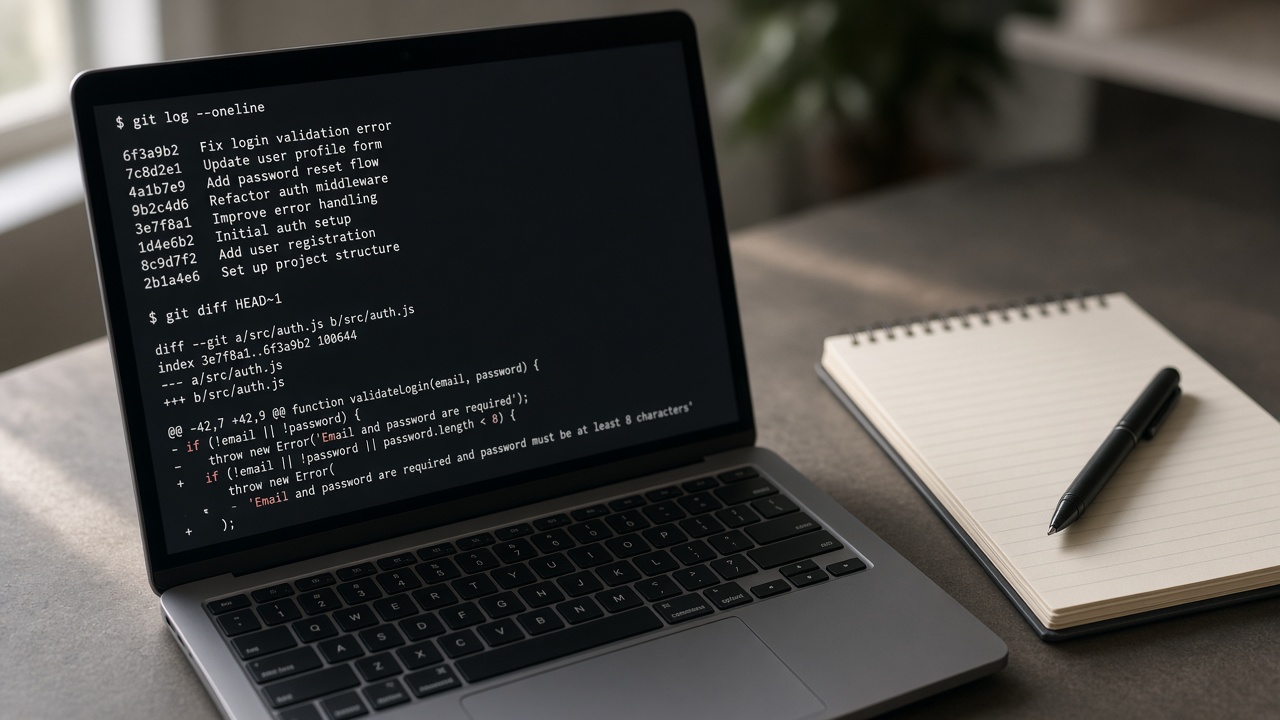
وقتی باگ ظاهر میشود، اولین سؤال اغلب «آخرین بار چه چیزی عوض شد؟» است. UI گیتهاب مفید است، ولی روی ترمینال، git log و git diff سریعترین راه برای حرکت در تاریخچه، مقایسهٔ شاخهها، و دیدن دقیقاً چه خطی قبل از commit در staging است. بدون این دو، amend و rebase و review شبیه رانندگی با آینهٔ شکسته است.
این مقاله جریان عملی میدهد: از log فشرده تا فیلتر مسیر، از diff کاری تا مقایسهٔ دو commit، و چند ترکیب که در code review محلی میدرخشند.
پاسخ کوتاه
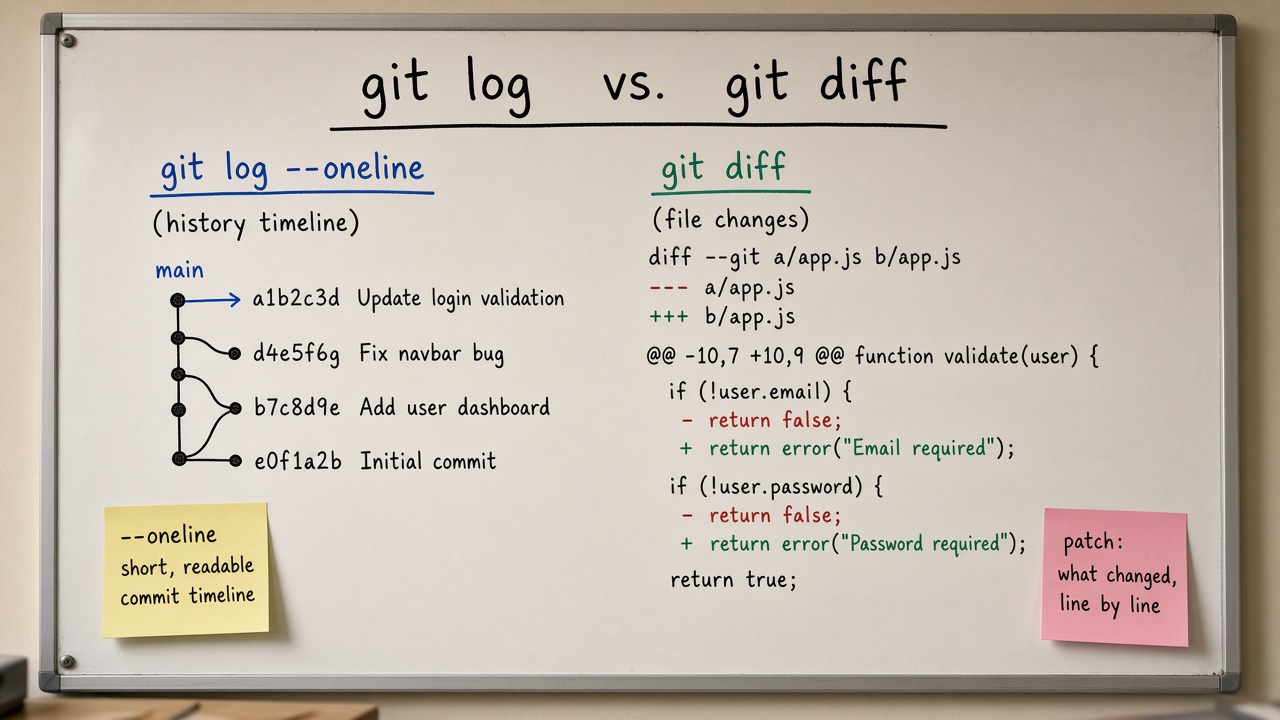
تاریخچهٔ خلاصه: `git log --oneline --graph --decorate -20`. تفاوت کار ذخیرهنشده با index: `git diff`. تفاوت index با HEAD: `git diff --staged`. تفاوت دو نقطه: `git diff main...feature`. جزئیات یک commit: `git show <sha>`. همیشه قبل از commit بزرگ، staged را با diff بخوانید.
log میگوید چه وقت و چرا؛ diff میگوید دقیقاً چه.
git log: نقشهٔ commitها
نمای روزمره
bash
git log git log --oneline -15 git log --oneline --graph --decorate --all -25
گراف ASCII برای دیدن merge و واگرایی شاخهها کافی است. --decorate نام شاخه و تگ را کنار commit نشان میدهد.
فیلتر زمانی، نویسنده، پیام
bash
git log --author='Soheil' --since='2026-01-01' --until='2026-09-01' git log --grep='fix:' --oneline git log -S 'calculateTotal' --oneline git log -G 'TODO|FIXME' --oneline
-S (pickaxe) commitهایی را میآورد که تعداد رخداد یک رشته عوض شده؛ برای پیدا کردن معرفی یا حذف یک نماد عالی است. -G با regex روی پچ.
محدود به مسیر
bash
git log --oneline -- app/services/billing.py git log --follow -- app/services/billing.py
--follow تلاش میکند rename را هنگام تاریخچهٔ تکفایل دنبال کند. برای پوشه، pathspec بعد از -- بگذارید تا با گزینهها قاطی نشود.
بازه بین شاخهها
bash
git log --oneline main..feature git log --oneline feature --not main git log --oneline --left-right main...feature
دو نقطه: commitهایی که از tip راست میرسند ولی از چپ نه — یعنی «چه چیزی روی feature هست که main ندارد». سه نقطه در log معنای reachability متفاوتی از diff دارد؛ در review معمولاً main..HEAD واضحتر است.
git show و ابزارهای کنار log
bash
git show HEAD git show abc1234 --stat git show abc1234 -- app/models/user.py
show متادیتا و پچ یک شیء را یکجا میدهد. برای خطبهخط تاریخی روی فایل:
bash
git blame -L 40,80 app/services/billing.py git log -L 40,80:app/services/billing.py
git diff: سه مقایسهٔ اصلی
سردرگمی رایج از این است که diff بدون آرگومان «همه چیز» را نشان نمیدهد.
| دستور | چه را با چه مقایسه میکند |
|---|---|
| git diff | working tree در برابر index |
| git diff --staged / --cached | index در برابر HEAD |
| git diff HEAD | working tree+نسبت به HEAD (شامل staged و unstaged بهصورت ترکیبی در عمل برای دید کلی نسبت به آخرین commit) |
| git diff main feature | درخت دو نوک شاخه |
| git diff main...feature | از merge-base تا feature (تغییرات شاخه نسبت به نقطهٔ جدایی) |
bash
git status git diff git diff --staged git diff HEAD
خواندن خروجی diff
هدر فایل، @@ hunk @@، خطوط + و - را بشناسید. برای آمار فشرده:
bash
git diff --stat git diff --word-diff git diff --name-only git diff --name-status
در review متنی، --word-diff گاهی نویز خط کامل را کم میکند. برای باینری، Git معمولاً «binary files differ» میگوید؛ آن فایلها را در PR با ابزار مناسب ببینید.
قبل از commit: آیین اجباری
bash
git add -p git diff --staged git commit -m "..."
دیدن staged همان چیزی است که واقعاً ثبت میشود. بسیاری از نشت secret و فایلهای تولیدشده دقیقاً چون کسی status را دید ولی staged diff را نخواند رخ میدهد.
مقایسه در Pull Request محلی
bash
git fetch origin git diff --stat origin/main...HEAD git log --oneline origin/main..HEAD
این جفت به شما میگوید چه commitهایی میروید و حجم پچ چقدر است — قبل از باز کردن UI.
فرمت پچ و ارسال
bash
git diff > /tmp/change.patch git apply --check /tmp/change.patch
برای گردشهای قدیمی email یا انتقال بدون remote گاهی format-patch بهتر است؛ برای اکثر تیمهای GitHub، PR جایگزین است. دانستن پچ در عیبیابی CI و اعمال اضطراری هنوز مفید است.
پیکربندیهای کوچکِ پربازده
bash
git config --global alias.lg "log --oneline --graph --decorate -20" git config --global alias.ds "diff --staged" # رنگها معمولاً پیشفرض مفیدند git config --global color.ui auto
اشتباههای رایج
- دیدن فقط git diff و فراموش کردن تغییرات staged.
- گیج شدن بین دو نقطه و سه نقطه در diff شاخهها.
- اعتماد به message بدون خواندن پچ.
- log خیلی بلند بدون pathspec در ریپوی بزرگ.
- نادیده گرفتن commitهای merge در تفسیر تاریخچه.
مثال عیبیابی: کی این رگرسیون آمد؟
bash
git log -S 'enableNewCheckout' --oneline -- app/ git bisect start git bisect bad HEAD git bisect good v1.4.0 # تست، good/bad، تا پیدا شدن git bisect reset
log برای یافتن نامزدهاست؛ bisect برای جستوجوی باینری بین good و bad. ترکیبشان سرعت پیدا کردن «اولین commit خراب» را بالا میبرد.
خلاصه
git log نقشه و فیلتر تاریخچه است؛ git diff میکروسکوپ تفاوت. اگر فقط یک عادت بسازید، این باشد: قبل از هر commit، `git diff --staged` را بخوانید، و قبل از هر PR، `log` و `diff` نسبت به شاخهٔ پایه را یکبار محلی ببینید.
سوالات متداول
چرا diff خالی است ولی status میگوید modified؟
احتمالاً همه چیز staged است؛ `git diff --staged` را بزنید.
تفاوت git show و git diff HEAD~1 HEAD چیست؟
برای یک commit معمولی، show آن commit را نسبت به والد نشان میدهد؛ diff دو درخت دلخواه را مقایسه میکند.
چطور فقط فایلهای من را در هفتهٔ اخیر ببینم؟
`git log --author='...' --since='1 week ago' --name-only`.
منابع و مراجع
- Git — git-log: https://git-scm.com/docs/git-log
- Git — git-diff: https://git-scm.com/docs/git-diff
- Git — git-show: https://git-scm.com/docs/git-show
- Git — git-blame: https://git-scm.com/docs/git-blame
- Git — git-bisect: https://git-scm.com/docs/git-bisect
Author
Soheil Ebrahimpour is the founder of FutureForge. He works on product design, architecture, and getting custom software into production.
Related notes
If you are unsure about architecture or the build path, we can talk about the project.
Describe the problem and the constraints. If there is a fit, we will schedule a conversation.